

Windows 11 is introducing “accelerated app launches,” and MS Edge is the first app to use the capability. When Edge is already running in the background and you click a link or open the browser from the taskbar or Start menu, Windows now sends the request directly to the running Edge instance instead of launching an additional temporary process. As our testing showed, this allows the app to open much faster.
We identified the change in the latest Release Preview update, where MS describes it as “the first step in a broader Windows capability that any app can adopt to speed up its own launches.”
I updated my test PC to the latest Release Preview build and tested Edge with the new accelerated app launch feature. Edge now opens noticeably faster when other apps are already running. This capability could eventually help other Windows apps open more quickly, which would be a welcome improvement because the operating system is known to take longer to launch certain apps while others are running.
Windows 11 Now Skips an Extra Process When Opening Edge
MS released KB5127936 to Windows Insiders in the Release Preview Channel on October 16, 2026, moving Windows 11 25H2 to Build 26200.9807 and Windows 11 26H2 to Build 26300.9807. The Edge change is part of a gradual rollout, so it may not appear immediately after the update is installed.
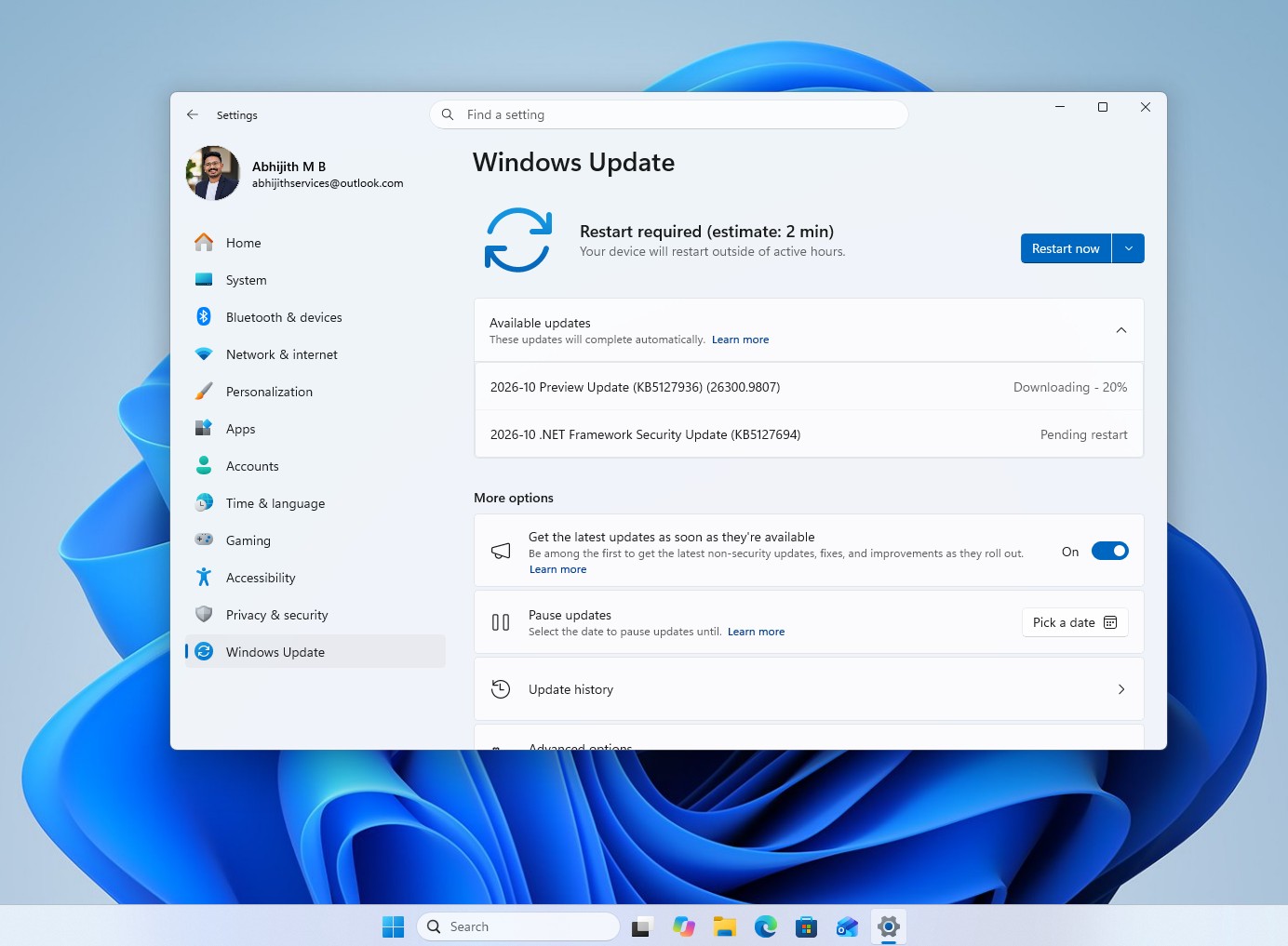
“Windows now routes your request directly to the running instance instead of first starting an extra, temporary process,” MS explains in the changelog. “Removing that step shortens the launch path, so Edge responds more quickly, most noticeably on busy devices when you’re multitasking.”
The change applies only to warm launches, when Edge is already running in the background. This situation is more common than it may seem because Edge’s Startup Boost feature keeps the browser running in the background even after it is closed. Opening Edge for the first time after restarting the PC will not become faster, and MS has not disclosed how many milliseconds the feature saves.
Edge Before and After the Update: Test Results
My test PC is a virtual machine with only 4GB of RAM. It is therefore expected to deliver poor performance, which means that even a modest improvement on this system should translate well to a standard PC.
Before installing KB5127936, I recorded Edge opening from the taskbar immediately after a restart, and it launched relatively quickly. However, there was a noticeable delay when I opened it from the taskbar while MS Store and Paint were running.
After installing the update, Edge’s initial launch speed remained unchanged. However, when MS Store and Paint were open, Edge launched much more quickly. This demonstrates Windows 11’s accelerated app launch capability.
MS Wants Every Windows App to Launch Faster
By default, many Windows apps are multi-instanced, meaning each launch starts a new process and opens a new window. Apps such as Edge are single-instanced. MS’s app-instancing documentation states that “attempting to launch a second instance of a single-instanced app typically results in the first instance’s main window being activated instead.”
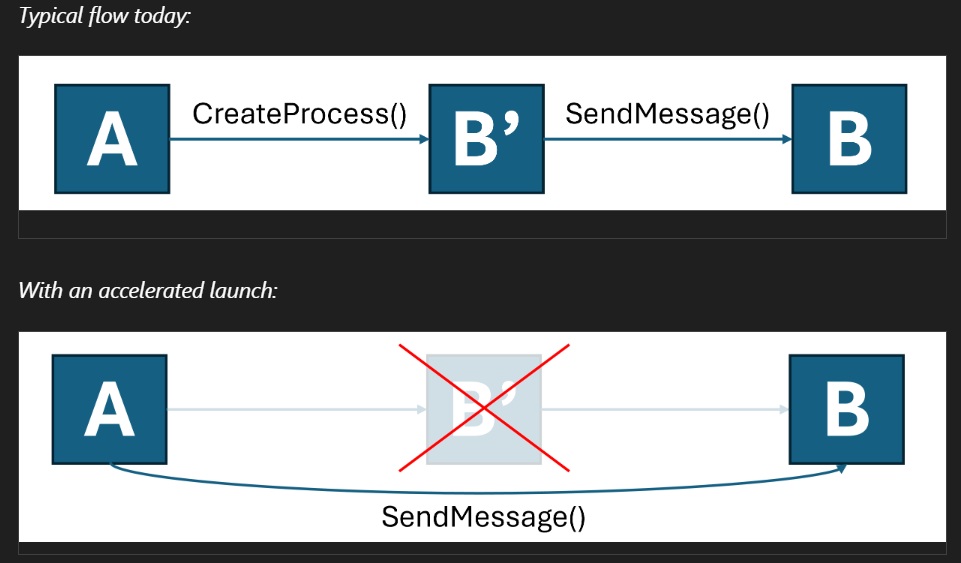
The problem with this approach lies in how Windows activates the existing instance. When you click the icon of a single-instanced app or select a link associated with it, Windows still starts a new process. That process checks whether the app is already running, transfers the request to the existing instance, and then exits. It is an unnecessary intermediary, and launching it can take time on a PC that is already busy.
MS has been quietly working to remove this intermediary. A MS Learn page titled “Register your application for accelerated warm launches,” dated October 2025, explains the capability for developers. With an accelerated launch, the running app registers a window with Windows. When the app is launched again through its Start menu icon, taskbar icon, or an associated link, Windows sends the request directly to that window. MS says this “reduces overall latency by eliminating the intermediary process.”
However, according to the documentation, apps do not receive this capability automatically.
Therefore, Edge’s adoption of accelerated launches does not mean that apps such as Spotify or Discord will open faster next month. However, if MS makes the APIs available, any single-instanced app that remains active in the background could also bypass the intermediary process.
Windows Already Has Other Ways to Accelerate App Launches
MS has previously attempted to make apps open faster, primarily by keeping them running in the background.
According to MS, Edge’s Startup Boost feature “starts core MS Edge processes in the background to keep them ready when the browser is closed.” MS Office uses a similar approach through a Startup Boost task that keeps Word loaded in a paused state on PCs with at least 8GB of RAM.
File Explorer also received a preload feature. When we tested it last year, Windows 11’s File Explorer still opened more slowly than its Windows 10 counterpart, while the preloaded process consumed an additional 35MB of RAM.
Accelerated launches take the opposite approach. Rather than keeping more components in memory, Windows simply skips unnecessary work. This is preferable to adding another background process. MS is also reducing WinUI’s RAM usage, so Windows 11 could feel more responsive over the coming months while consuming less memory. We have already observed this in Windows 11 26H2, which uses 2GB less RAM.
If MS follows its usual release schedule, accelerated Edge launches should reach the optional update later this month, followed by the November 2026 Patch Tuesday update on November 10. However, because the feature is rolling out gradually, some PCs may receive it later.
Windows Latest depends on readers like you. Make us your preferred source on Google Discover and Google Search, and help our independent reporting reach more people.
