Google Expands Canvas in AI Mode to All U.S. Users
Google has expanded access to Canvas in AI Mode to all users in the U.S. who use English, following its initial launch as part of the Google Labs experiments last year.
What Is Canvas in AI Mode?
Canvas in AI Mode is designed to assist users in organizing and planning projects or conducting in-depth research. According to a recent blog post by Google, the feature now includes capabilities such as drafting documents or creating custom tools directly within Google Search.
Applications and Features
Google has suggested a variety of use cases for Canvas:
- Building study guides by uploading class notes and other reference materials.
- Transforming research reports into web pages, quizzes, or audio overviews.
- Completing creative tasks, which sometimes overlap with Google’s Notebook LM research tool.
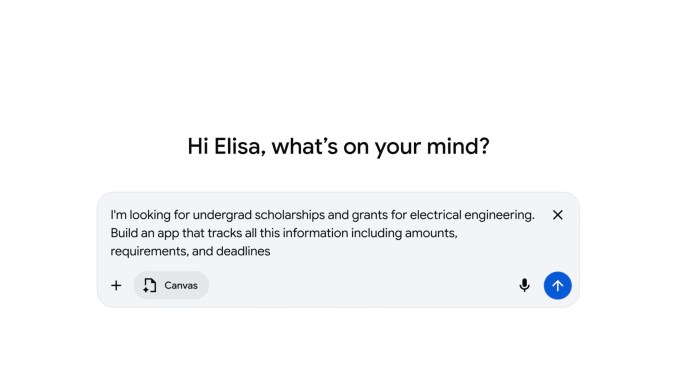
Users can describe an idea to Canvas, which then generates the code to turn that idea into a shareable app or game. Additionally, Canvas can assist in refining creative writing drafts and providing feedback on various projects.
Integration with Gemini
Canvas is already integrated into Gemini, where Google AI Pro and Google AI Ultra subscribers have access to the advanced Gemini 3 model. This includes a significantly larger 1 million-token context window, facilitating more complex projects.
Now that Canvas is available to all users in the U.S. through Google’s AI search feature, known as AI Mode, even those who haven't explored Gemini’s capabilities will gain exposure. This broad accessibility highlights one of Google’s key advantages in the AI race — the extensive reach of Google Search, which places its products in front of billions of users worldwide.
How to Use Canvas
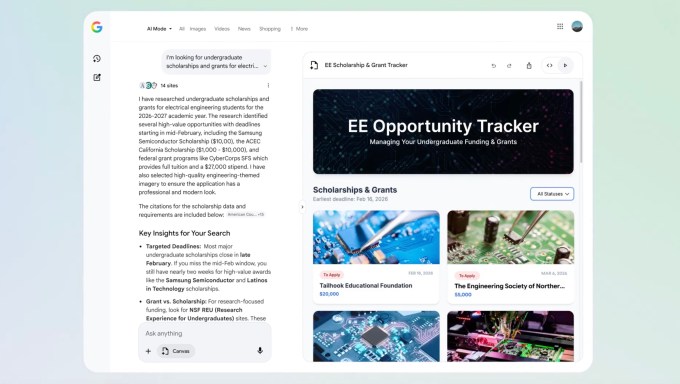
To use Canvas, follow these steps:
- Select the Canvas option from the tool menu (+) while in AI Mode.
- Describe the project or creation you'd like to build.
- Access the Canvas side panel, where you can gather information from the web and Google’s Knowledge Graph.
- If building a prototype or app, test its functionality, view the underlying code, and refine its performance by interacting with Gemini.
Competition in the AI-Driven Tools Space
Canvas faces competition from rival tools developed by OpenAI and Anthropic. For instance, OpenAI’s ChatGPT includes a Canvas feature that triggers automatically based on user queries, whereas both Google’s Canvas and Anthropic’s Claude require more direct interaction. Nevertheless, these tools all offer assistance with writing, ideation, and turning concepts into tangible projects.