Canva Introduces AI Kill Switch Across Its Tools
Canva Introduces New Controls for Generative AI Features and Content
Over the past few years, Australian design platform Canva has integrated generative AI throughout its products. Now, the company is giving users the option to make those AI features less visible. On Thursday, Canva announced two new controls for Canva Free and Canva Pro users. One toggle hides its generative AI features, while the other reduces the amount of AI-generated material displayed in its library of templates and graphics.
Hiding Canva’s Generative AI Features
The first control seems largely symbolic. Users who do not want to use AI tools can simply avoid selecting the sparkly AI button. The second control is more useful, however, because it can prevent users from being overwhelmed by AI-generated material while browsing the Canva libraries that originally made the suite popular. Notably, the switch does not remove all AI-generated material from view; it merely displays less of it.
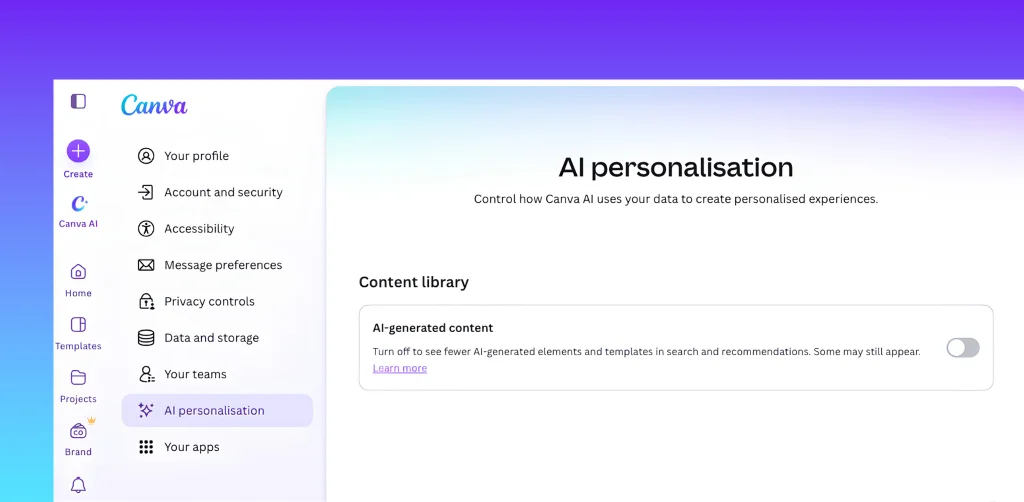
Both controls are located within separate settings menus. The general AI “kill switch” can be found under Profile > Settings > Permissions. When switched off, Canva’s generative features are “hidden across Canva,” according to the company’s announcement. These features include Magic Expand, which extends a photo, and Canva Craft, the company’s first internally developed generative image model. Users can restore access to these features at any time.
However, Canva does not remove every AI-powered tool. The suite’s AI-based Background Remover and Magic Grab—which isolates an object in an image so it can be repositioned elsewhere in a design—are classified as “assistive editing tools.” As a result, they remain accessible even after generative AI features are disabled.
Reducing AI-Generated Content in Canva’s Library
The second control is located under Profile > Your Account > AI Personalization. When enabled, it reduces the amount of AI-generated material appearing in search results and recommendations, giving greater prominence to human-created content. Canva says AI-generated content represents only “a small portion” of its library, including abstract backgrounds and illustrated graphics.

This filter is valuable for users who do not want to sort through large volumes of generative AI content. It also benefits the people behind the designs. Canva compensates human creators each time someone uses their work in a design. In theory, prioritizing human-made content directs more money toward the designers and illustrators who contribute to Canva’s library.
Giving Users More Choice Over AI
These features effectively serve as a temperature check on public attitudes toward AI. Canva linked the launch to public sentiment, citing Pew Research Center data showing that roughly six in ten Americans want greater control over how artificial intelligence is used in their lives. “We believe the future of creativity should be defined by choice, not dictated by technology,” the company said in a statement.