
 STEAM
STEAM
 PC Game

Microsoft Confirms Bing-Free Windows Search in Windows 11
Microsoft has officially confirmed that Windows 11 Start Menu search will allow users to disable Bing web results. This change ensures that Windows Search will now surface only local files and apps, delivering a truly offline experience. Additionally, Microsoft is decoupling Microsoft Rewards from Windows Search to improve speed and reliability.
Marcus Confirms Enhanced Windows Search Experience
In a post on X, Marcus, the design director at Microsoft, announced that Windows Search is becoming faster, more reliable, and will soon include the option to disable web results. According to Microsoft, Bing will remain enabled by default in Windows Search, but users can turn it off in just a few clicks. This eliminates the need to modify the Windows Registry, use Group Policy settings, switch regions, or install LTSC versions of Windows to disable Bing integration.
How to Disable Bing in Windows Search
- Open Settings.
- Navigate to Privacy & Security > Search.
- Toggle off the “web results” option.
Once Bing is disabled, Windows Search will display only local results, and the Microsoft Rewards icon will no longer appear. Additionally, disabling Bing will eliminate Copilot ads when searching for files. This update also removes items from MSN, Bing, and other linked Microsoft services on the Windows Search homepage, leaving a clean interface that shows only your recent searches. The resulting experience will be similar to or better than Windows 11 LTSC, where web search is already completely disabled.
This feature is still in testing and will roll out to users soon.
Windows Search Without Bing: A Game-Changer
While Windows Search isn’t inherently terrible, it has been criticized for being frustrating and ineffective at locating the correct files. The core issue lies in the integration of Bing/web search, which complicates its ability to efficiently search local files and apps.
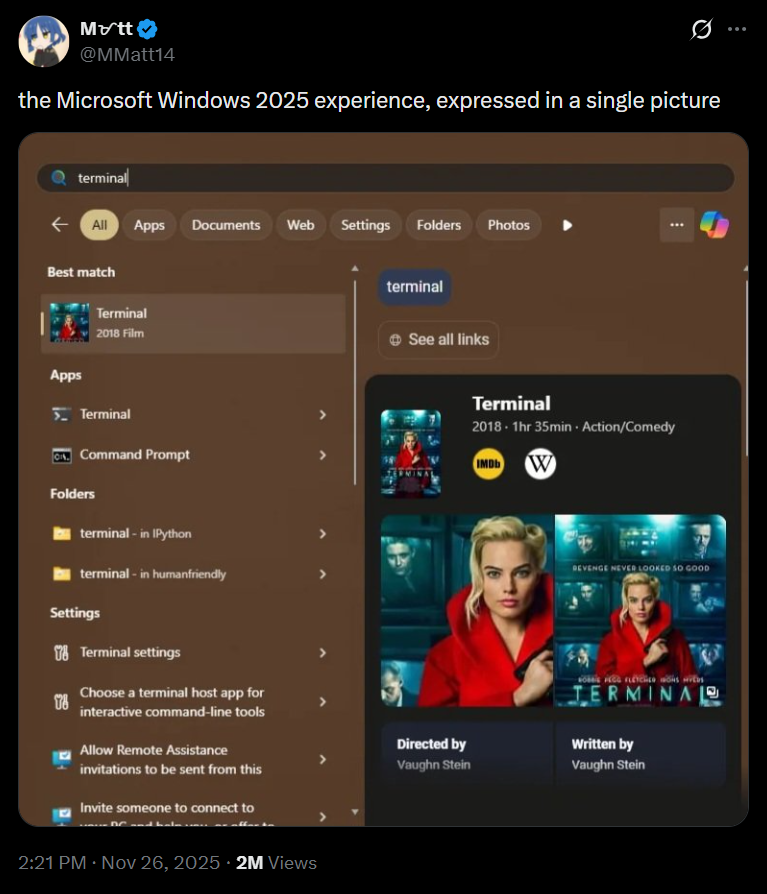
Third-party tools like PowerToys demonstrate the potential for faster and more accurate file and app searches. Interestingly, these tools rely on the Windows Search Indexer, the same system that powers the native Windows Search panel. This raises the question: why does Windows Search struggle when other applications using the same indexer perform better? The answer lies in Bing integration.
The Impact of Bing Integration
When Bing/web search is enabled, Windows Search must filter results between local files, apps, and the web. This often leads to confusion about user intent. For example, searching for "Maps" might prioritize Bing’s web results over the locally installed Maps app. This inefficiency stems from the need to balance multiple search contexts.
Improving Windows Search by Removing Web Integration
Windows Search operates on an algorithm and index-driven approach, similar to traditional search engines. While it lacks AI capabilities to intelligently interpret user intent, it performs significantly better when web search results are excluded. By focusing solely on local files and apps, Windows Search can deliver faster and more accurate results.
Windows Latest depends on readers like you. Make us your favorite source on Google Discover and Google Search to help our independent reporting reach a wider audience.
